Change and Innovation


Those two words go so well together. To change, one has to adapt and evolve. Innovation is about adapting and evolving in a way. Viv Waters is an understated presenter who delivers the goods and I confess I don’t know Jonnie Moore but for $150 for the day this seems like a worthwhile investment. It may be more a practitioner’s event than a corporate one but all learning is learning! Sounds good and eventful. Check it out if you’re in Sydney. Click here –

http://innotecture.wordpress.com/crumbs/

Go To Training: a new e-learning option?

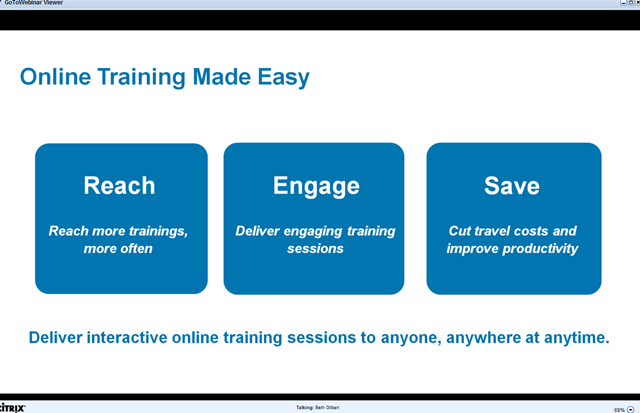
I woke up bleary-eyed this morning to sit in on a webinar explaining the new GO TO TRAINING – Online Training Made Easy.


Why would people be interested in an online learning tool? In a snap poll the reasons included having to do more with less (72%), being able to access more people with training (72%) and being able to deliver training more quickly (58%).  So savings (time and money) and reach are the biggest motivators. For me, being able to deliver training in smaller chunks at times that more people are able to be available is also a key reason. For example, this tool enables you to deliver a 5 hour session on a weekend, a 2 hour session in the evening or a 1 hour session at lunchtime. You save on room, catering and facility costs, travel time, travel expenses, and you can deliver with just one person.


Firstly, it was a good product presentation and it did make me interested to learn more. Here are some key points for you. …

image

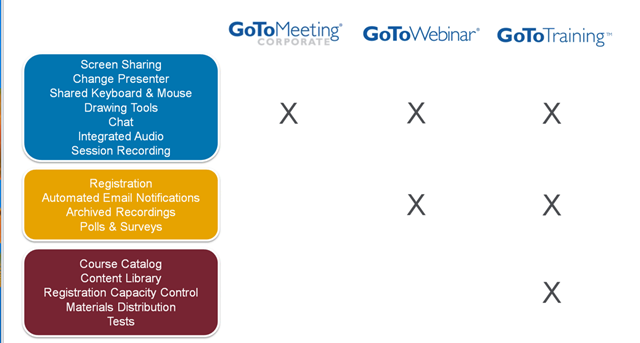
The product comes from the stable of GO TO MEETING and GO TO WEBINAR by Citrix. A lot of people already use GTW to deliver some learning. At AITD I know we use this tool for teaching how to run webinars and learn about Social Media. In fact, the people who may be most interested in this product are those who are already delivering training online. Here’s how the three products differ click any image for a larger view)

Schedule Sessions

image

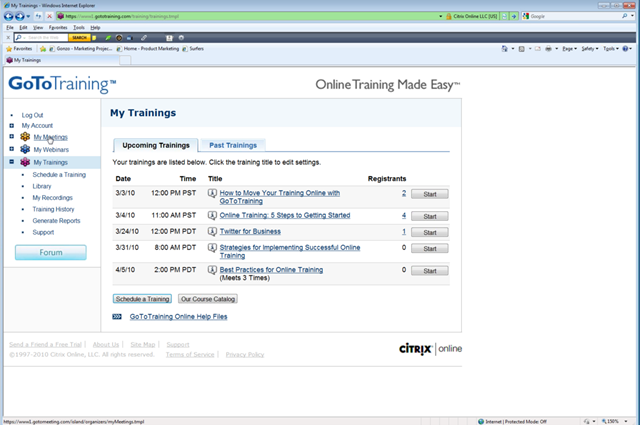
Once you login to your account you are taken to a Control Panel. Your menu options reside on the left hand side and you can navigate to any of these items  Schedule a Session, Manage the library of materials, Manage Recordings of previous sessions, View History or Manage Reports. First page view after login gives you access to your future and past training sessions. By clicking on a session you can go straight to it to modify anything or you can start to set up a new session by clicking the tab at the bottom.


image Add New Course to Schedule

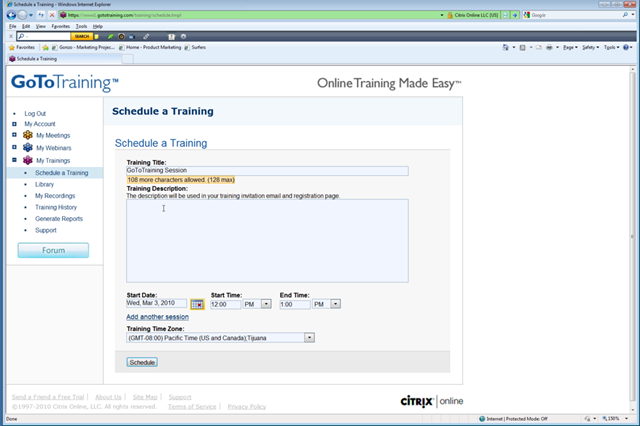
Setting up a new session is quite easy. Administration-wise, what can takes weeks to organise can be done in minutes through the system and much of the communication is automated eg email invites, reminders etc. For me, that was great to see. As a boutique training provider, time saved is highly valuable and I can invest that time into developing content and working closer with clients.


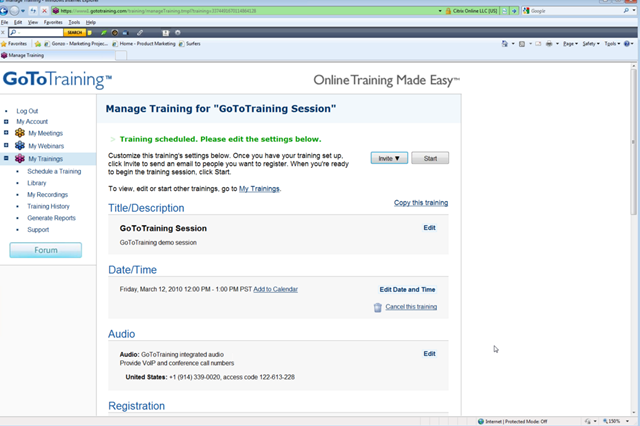
image Once you set up the session details, you can edit the course itself. As you have your course content compiled (offline of course) it’s an easy process to upload and define what course materials apply to a session. You can define what tests you may want to include, what polls you might want to have, etc.

Register Participants 

image

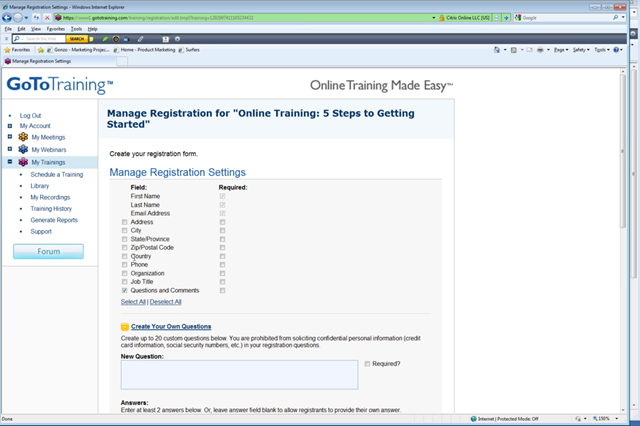
Adding the registration page is easy and you can define what info you want attendees to enter.  And once people register, all the work in compiling attendee lists etc is done behind the scenes for you. No ore typing up lists. Reminders can be set up easily. If you need them to do a pre-test, set that up and it’s arranged automatically. Cool.


image

Predefined fields or custom fields are available to make registration suit you and your organisation. Make it simple or comprehensive for people to register. Ask pre=condition questions. Arrange tests, opinion polls, have them review material whatever.  You control it here.


image


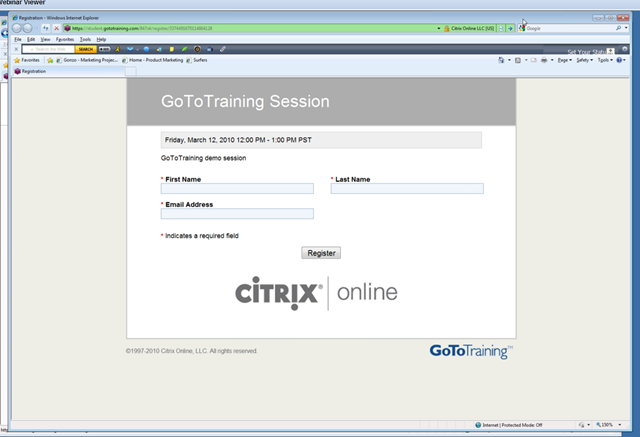
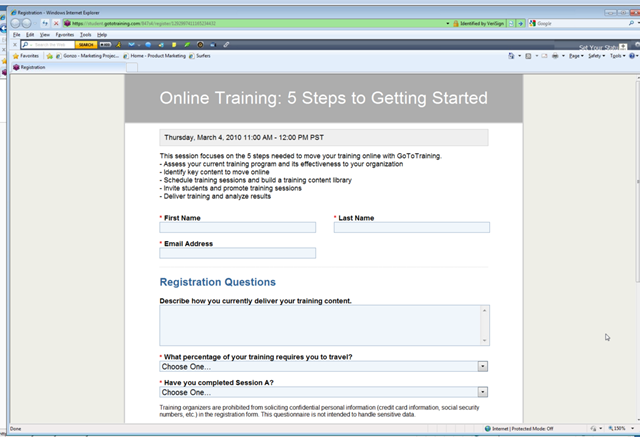
Registration is instantly online. People are either directed to a webpage or you can insert a link to the page in an email invitation (which can be automagically sent!). This is what the participant might see when they arrive at the registration page. All the info is seamlessly blended in the backend for you.


image

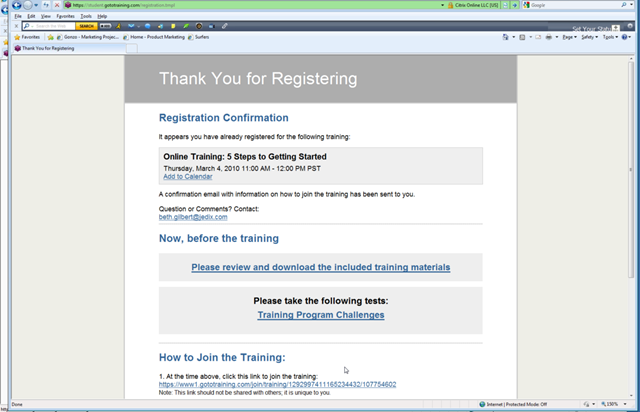
Go To Training then confirms the registration of the delegate for you. It delivers a confirmation page and you can control what is included. They get instructions on how to join the session, what to do beforehand and where to go for questions. If you want to do some pre-work, let them know here!

Course Listing

image

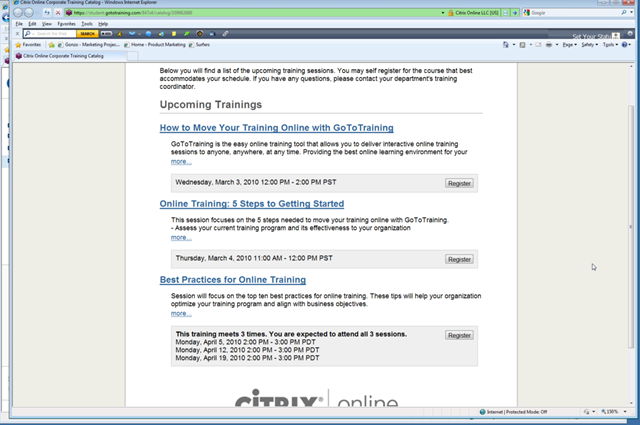
In Go To Training you build a Course Catalogue which is available to people to see which course to enrol in. Ideal for compliance training, accreditation courses, CPD offerings and general course options available. You can set up a series of sessions or include everything you’ve got! 

Content

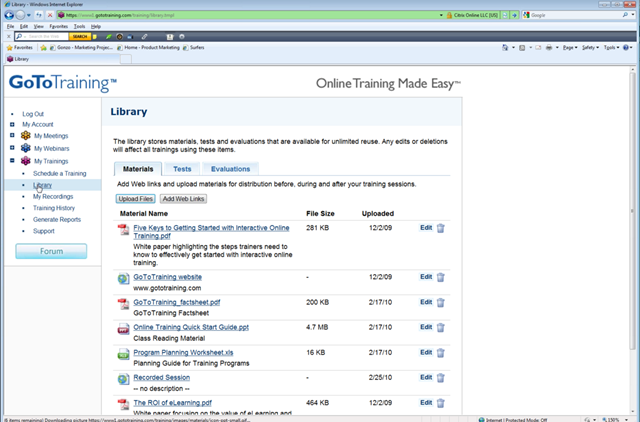
In your Admin Control Panel one of your menu items is Library. This is where you store your course content items. These can be anything you can put online – PDF files, PPT slides, Audio, Video, Word docs, Web Links, Whatever. GTT has a storage limit of 2gb per ‘trainer’ registered imageunder the Account. So if you have  trainers in the account you get 10gb. That’s a fair whack of storage (unless you use lots of audio and video which will suck it up quickly!).  All or any of this material can be made available to attendees Pre-course, During course or Post course – as determined by you.  Tests and Evaluations you design are included in separate tabs. You can only upload 300mb each time you upload but so long as you don’t go over your 2gb limit you’re sweet.  If you think you will go over your limit you may want to load audio and video elsewhere and just put the link to them in the Library.

Tests

image

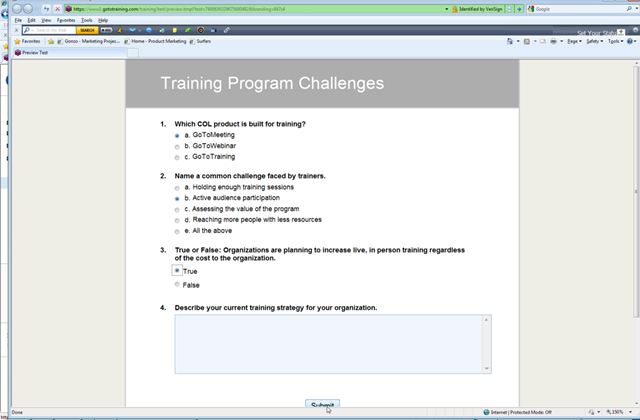
Sample test pre course. Tests can be made available pre/post or during … or all three! You can set up multiple choice, short answer, long answer, true/false. Each test can have up to 25 questions. You can set a series of tests for a session. You can decide if you want to give participants the right answers after scoring, give them their scores, or not. It’s a reasonably flexible test system.

Reports

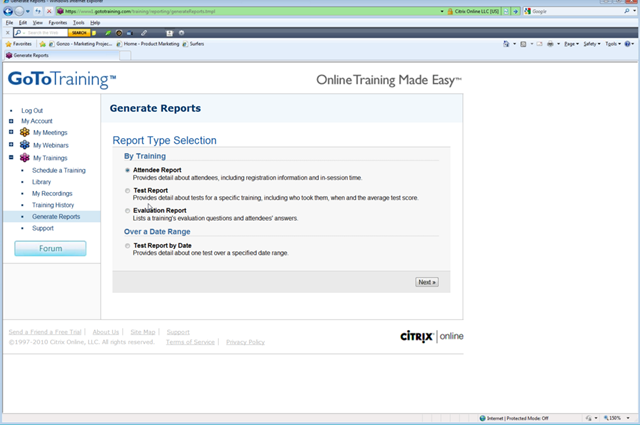
Under the Reports menu item, there are three categories of reports image Attendee, Tests and Evaluations. The inbuilt reports are very accessible and the option to choose a date range is great. If you notice a particular question in a test is not getting the right answers you can review what’s changed and tweak your course or test to hit the mark better. It may be the question is clear to you but not the participants.

Summary of GoToTraining

Overall, the Key Benefits of Go To Training are these:

  • ease of use, especially if you are familiar with webinar technology
  • flexibility in modifying, adding and scheduling content and sessions
  • frequency of training delivery unlimited
  • reach more people, especially those who geographically miss out on training
  • deliver engaging training and monitor attention/interactivity
  • save on training costs – facility costs, admin costs, travel costs and more
  • enable learning even if people miss the session


Online learning as we all know is not the be-all and end-all of delivering training. It will never replace face to face learning just as recruitment technology hasn’t replaced the need for face to face interviews.  What online learning does is enable more people to access learning who were limited before. It enables learning to be delivered in time frames that suit the learner. It enables learners to focus on the interactivity and content rather than the admin to support the learning. So it is a great adjunct to existing training options and in some cases may be the major training delivery mode for regional staff. The product offerings in online delivery keeps getting better and GoToTraining is a terrific extension that integrates e-learning within the constraints of the product itself. It doesn’t have all the bells and whistles that a dedicated e-learning tool may have but it sure is a great solution for those who don’t have the infrastructure or resources to build a dedicated LMS.

Get a Trial of Go To Training 

Want to have a go? Get a free 30 day trial. Just hop online and try it out. You have to give all your details and Citrix will call you/email to make arrangements. Sign up for the trial or hopefully this review will give you enough to go on for now. Click here for the trial.

What a Cool Tool


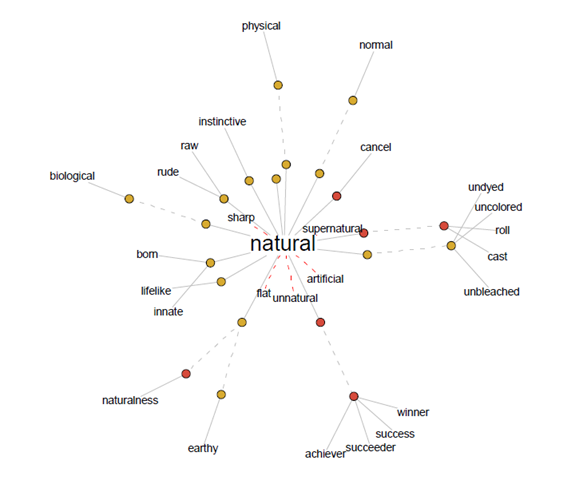
I came across this site purely by default, as I often do. What it does is take any word you choose and instantly populate in graphical terms, all the antonyms and synonyms associated with it. For example, I used my company name, “Natural” and it produced this brilliant graphic with related nouns and adjectives. So cool! Practical and pretty.image  Click on the image to see a larger version.


What could you use it for?

– Explaining terms.

– Communication courses.

– Definitions.

– Smarten up your next presentation.

A myriad of uses really. A cool tool that’s quick to use and needs no prior knowledge!  Love it.

See it in action yourself at http://www.visualthesaurus.com/

Presentation Tip – 10 Ways To Stop Boring Your Listeners (How to use Vocal Variety)


Here’s the problem and its remedy is vocal variety.

You are giving a speech or presentation and,  although the content is excellent and  matches your audience’s expectation and needs, nobody is listening.

Vocal variety can cure your bored audience.

Instead you are looking at blank, disinterested faces. Someone is checking their watch, another is doodling, and that person in the front row is struggling to stay awake.

Your voice is turning ears off. To put it bluntly, it is boring.

The cure for deaf by monotone, (mono-speed, mono-pitch or any other one way or no way), is vocal variety. You need it if you want to be actively heard.

Vocal variety is achieved through varying your voice pitch, tone, volume and speaking rate.

It’s the combination of these elements that gives a voice its vocal signature. Lack of variety in any one of them can make you boring to listen to.

To understand pitch think of music. It has high and low notes as do people’s voices. Everyone’s voice has a natural pitch and a women’s voice is generally higher than a man’s. In addition, everyone has a pitch range, the number of notes they habitually use. When that range is very small the effect is monotonous to listen to.

Tone refers to the emotional content carried by our voices. It is not the words themselves but how we say them. To speak expressively is to fill or energise our words appropriately. For example, a person who puts very little energy into their speech no matter what they are talking about is often described as being ‘flat’. By contrast someone who fills their speech to overflowing with energy is described as ‘exuberant’, ‘enthusiastic’ or ‘passionate’. If you think of a word as a basket to carry its meaning, you’ll get the idea. Some people put very little in their word baskets. Others stuff them to overflowing.

Volume is how loudly or quietly you speak. If you are either habitually loud or quiet, you need to learn how to consciously turn down or up the volume.

Speaking rate refers to the rate words come out of your mouth: how fast or slow you speak.

Your goal as a speaker is to have people listen. To achieve that you need to use the most appropriate expression or vocal delivery, matching both your content and your audience’s needs.

Banish boring monotony with these 10 vocal variety tips.

  1. 1. Try this experiment for Pitch

Say the sentences below in your high, middle and low pitch range. Note what happens to the ‘intensity’ and the way you perceive their emotional content when you alter the pitch. There will be a distinct variation between each.

Her Grandmother died yesterday.

I want a new car.

This dinner is delicious.

People should love their neighbours as themselves.

  1. 2. The Tone Ham Sandwich Exercise:

Repeat the words ‘Ham Sandwich’ in as many varying ways as you can. For example say it angrily, happily, sadly, lovingly, despairingly, laughingly, importantly, slyly, snidely, shyly… This is a fantastic exercise to share with a partner. Take turn about giving each other the way to say the phrase. Repeat until you run out of variations. NB. Listen for emotional truth or believability!

3. Telephone Book Readings for Improving Tone:

Open the telephone book at any page. Select a style* or emotion and read aloud whatever is there. Sustain each feeling state for at least a minute. This gives you time to get into it. Listen to yourself to make sure you are filling those words with the appropriate emotion.

*Style? For fun and variation read your page in the style of a newsreader, a race commentator, a preacher, Marilyn Munroe…

4. Reading Children’s Stories:

Take a familiar story and read it aloud. As you do make sure your voice carries the meaning of the words. If a scary voice is asked for, use one. If somebody is bossy, sound bossy. If someone is teasing, put a teasing tone in your voice. If there’s a beat to the words, go with it. Find and emphasize it.

This a great exercise to record. When you listen to yourself, be alert for areas to improve. Record it again with the changes. And remember to try out your new improved reading skills with a child. Their feedback is direct and honest. You’ll soon know whether they enjoy the story or not!

5. Listen to Recordings of Novels,Short Stories, Autobiographies…

Many of these are read by highly skilled actors. Apart from enjoying the story, you will learn a great deal about expression. You can find audio tapes or CD’s at your local library or download them from the net. Many are free!

6. For Volume:

Use the following exercises to learn to project your voice naturally.

The skill involved with getting louder (or softer) is to maintain tone and pitch while altering the sound level. Many people lose them both, particularly when they get louder. Shouting may guarantee you get heard but it doesn’t usually mean heard with pleasure. And the other down-side to shouting is straining your voice. Good breath control is one of major keys to upping the volume while maintaining tone and pitch.

Practice Breathing Using your Diaphragm:

Stand in front of a mirror. Make sure your feet are a comfortable shoulder width apart. Pull yourself up straight and let your head sit square on your neck. Place one hand on your stomach. Breathe in. You should feel your stomach rising and then breathe out. This time your stomach falls. Watch your shoulders. If they rise and fall noticeably you are most likely breathing off the top of your lungs. Try until you can see and feel a definite rise and fall of your stomach while staying relaxed.

7. Distancing Technique for Volume Projection

Maintain the breathing technique outlined above and add voice. While watching yourself in the mirror to check for tension, (tightening of muscles), practice greeting yourself at ever increasing distances from the mirror. The first ‘Hello Susan, Bob’   (insert your name) is right up close. Then take two steps back and repeat. Now step back another two steps and greet yourself again.

(If your room is small, do the exercise outside and imagine the mirror! It remains in the same place all the time.)

If you feel any tension in your throat or chest from forcing the sound, stop. Breathe and begin again. It helps to imagine the sound arcing through the air, in a concentrated focused stream to reach its target. The further away you get the more control you need to have over the outflow of air carrying your words.

8, When you think you have a neutral ‘Hello Bob’ mastered, add emotional colour. Say ‘Hello Bob’ nastily, lovingly, sweetly etc. while remaining relaxed.

9. Laugh Out-loud

Stand in front of your mirror breathing easily. On your out breath begin a series of ‘Ha-ha-ha-ha’s’ until all your breath is used. Take an ‘in’ breath and start again. Vary your laughter. Make it louder, make it quiet and then build it up again. Repeat until you are laughing loudly and easily without any strain.

10. Read Out-loud

Make sure your stance and breathing is good. Pin point a place at the far end of your room to talk to and now read aloud from a book, making sure you maintain your relaxed state while using as much vocal variety as you can.

A good way to test you’re working as you should is to do this exercise with a partner. Have them stand at the far end of the room you’re practicing in. Give instructions to give you feedback on clarity, variety and pitch.

If you find yourself rising in pitch, check your breathing. When we tense, we strain the throat and when that happens our vocal chords are restricted. The result is we force the pitch up and limit the range or colour we can put into our words. If you  are straining will feel it in your upper chest and throat. In addition your shoulders will lift and you will run yourself out of breath easily.

To colour and control your voice the way you want to, practice and then practice some more. Play. Experiment. Exaggerate, have fun and you will make them listen.

Have you got the power of the pause?  Silence in the right place speaks louder than any word can ever do.  How is your articulation and pronunciation? Is it clear? Can people understand you? Are you a motor-mouth? If so, can you put the brakes on? You’ll find more vocal delivery help tips and exercises at write-out-loud.com. Article by Susan Dugdale from write-out-loud.com

Email and SMS Language


Shorthand has been around since before the days of Pitman I’m sure, and every generation seems to invent its own language.  Lately in my training sessions I’ve noted an increase in younger delegates texting away during sessions (that’s another topic!). I’ve noticed they use short codes the same as the ones in Email, Chat programs, Forums, SMS’s and other space and attention is at a premium.

If, like me, you’ve felt like a dinosaur because you couldn’t work out what that abbreviated language meant, then here is a post that should enlighten you.


<G> Grinning
<J> Joking
<L> Laughing
<S> Smiling
<Y> Yawning
AAMOF As A Matter Of Fact
AFAIC As Far As I Can…
ASAP As Soon As Possible
BBFN Bye Bye For Now
BFN Bye For Now
BTW By The Way
BYKT But You Knew That
CMIIW Correct Me If I’m Wrong
EOL End Of Lecture
FAQ Frequently Asked Questions
FITB Fill In The Blank
FWIW For What It’s Worth
FYI For Your Information
GBU God Bless You
GMTA Great Minds Think Alike
HTH Hope This Helps
IAC In Any Case
IAE In Any Event
ICL In Christian Love
IMCO In My Considered Opinion
IMHO In My Humble Opinion
IMNSHO In My Not So Humble Opinion
IMO In My Opinion
IOW In Other Words
LMAO Laughing My Arse Off
LOL Lots Of Laughter
MGB May God Bless
MHOTY My Hat’s Off To You
NRN No Reply Necessary
OIC Oh, I See
OTOH On The Other Hand
PTL Praise The Lord
ROF Rolling On the Floor
ROFL Rolling On the Floor Laughing
ROTFL Rolling On The Floor Laughing
ROFLMAO Rolling On the Floor Laughing My Arse Off
RSN Real Soon Now
RTFM Read The F*** Manual
SITD Still In The Dark
TTFN Ta Ta For Now
YMMV Your Mileage May Vary
TIA Thanks In Advance
TIC Tongue In Cheek
TTYL Talk To You Later
TYVM Thank You Very Much
WYSIWYG What you See Is What You Get


Maybe we should start including some of these abbreviations in our training materials to engage Gen Z or whatever we’re up to! Scarily I’ve noticed I use 2 and 4 instead of “to” and “for” in my flip charting!

I’m sure there are more abbreviations .. know any?
IAC, folks, HTH. BFN!

Technology … love it!

There are some exciting new web applications floating around cyberspace these days. Here are a  few I’ve been exploring lately:

Dokeos.com- an e-learning tool that is open source (ie free and collaboratively built). It looks very comprehensive having used the online demo. At some point I may download it and see how it works under the hood. An easy solution to play with. I found Moodle complex to get going but that was when I looked at it in the early days so it may be more user-friendly now. I’ve also looked at LAMS and that seems great too but again not easy to use for the average-joey. Dokeo looks easy to use – I just haven’t spent enough time to work out how to put the content together yet!

dimdim.com – a cool web conferencing tool that does not require anyone anywhere to download anything. And it lets you schedule a meeting or do one instantly. It will also send reminders and notices. It even lets you embed the invite into your website. Looks really cool and I’m going to test it out with my AITD buddies to give it a live workout.

sugarcrm.com – an open source customer relationship manager (eg like Act! or Goldmine! or SalesForce etc). I tried the online demo and it is a very big program. Does lots but may be too comprehensive for this little black duck that just wants something relatively simple that will manage email campaigns and newsletter without all the sales management heavy tools. Still, it’s free and seems stable so may be great for some.

sliderocket.com – way cool. great website. am I finding a tool that I don’t really have a use for? Don’t know but I’m going to play ‘cos it looks so sexy!

blurb.com- this look a great tool to put together a book very easily and it provides a publishing option where you can order the book. I’ll let you know when I’ve written mine!

lectureshare.com- seems ok. Can make material public or private. Good to refer participants to after training, or to use as supplemental material after an event.

kineo.com – A funky UK e-learning company. I am looking at being their Aussie agent – contact me for details.

sproutinc.com – rich media campaigns and viral emails – cool site but has now changed from free to fee. Would have been good to try before giving over credit card details.

Here’s a great source of tools and all things e-learning – http://janeknight.typepad.com/pick/2007/01/elearning_for_f.html

and her directory is at http://www.c4lpt.co.uk/Directory/

Using Powerpoint Better

Death by PowerPoint

View more documents from Alexei Kapterev.

Have to say I, like many trainers, am guilty of using ppt as a prompt as much as a learning tool. Alexai and others serve to remind us that less can be more. It’s quick to knock up a ppt presentation. It’s more time consuming to put together a learner-focussed package using PowerPoint. Expediency isn’t everything. I’ll make a commitment to making my slide presentations more learner focussed next year.

Live and learn

Live life as if you will die tomorrow, learn, as if you will live forever

                                                                                   Mahatma Gandhi

In these times of negativity, it is easy to lose sight of the bigger picture.  Under threat, our natural tendency is to withdraw, go quiet, protect. It’s like hiding from the dragon until it has passed. That’s no way to live if the dragon takes up residence nearby for a while!


In times of threat a better response may be to continue to live life fully, continue business fully, keep working fully … just in a different way. One that is less expensive, more productive and just as beneficial if not moreso.


Just as importantly is to use the time to learn so you are better positioned when the  threat passes and you’ll find you’re streets ahead of those who just ‘retired’ until the threat passed.

Action Learning

Wow! Dr Michael Marquardt is an undisputed king of Action Learning. 

Recently he took a group of us through the process and theory behind conducting Action Learning and it was brilliant. I learned even more about the technique and found my skills grew over the time we spent together.

Action Learning is a deceptively simple technique that is way more than just asking questions. It comprises a methodology which underpins the learning content and application of the learning. 

When do you use Action Learning? Ideally when there is a problem to solve which has some immediacy or import.

What’s so special about it? It’s real-time learning and skill enhancement. The use of a Coach through the process is critical to ensure the session doesn’t turn into a general discussion or head straight into solution mode without exploring the possibilities and the process as well as individual and team development.

Michael utilises Action Learning for almost all of his leadership development work these days.

Personally, I have used Action Learning in a limited way up to now but will be embedding it into more of my consulting and development work in future. Give me a hoy if you would like to practice the technique or apply it in your own organisation.

Coaching and Mentoring

Chris Brooks and I led a lively facilitated discussion last night at AITD’s NSW professional development evening. It was inspiring to hear the level of knowledge and experience in the room. Lots of bright ideas and tons of interpretations, views and ongoing questions.

One of the pervading issues revolved around trying to tease coaching and mentoring apart.  Perhaps one of the great learnings from the evening were:

  • coaching and mentoring are about the learner, not what we call the initiative
  • fundamentally we still need a needs analysis to identify the issue and the best approach
  • mentoring involves coaching conversations and coaching may use mentoring
  • there are more similarities than differences
  • each organisation needs to contextualise their own definition of coaching and mentoring
  • coaching and mentoring need a structure and process to enhance effectiveness
  • evaluation is likely to be soft (eg feedback and observation) unless there are specific outcomes which are measurable
  • the stickability and practicality of the learning is dependent on defining clear outcomes and expectations, the level of commitment of the parties and the capability of the mentor/coach to empower the learner
  • educating the coaches and mentors is critical to the success of the program

In terms of

Read more